
Now on iPhone, iPad & Android
Turn photos of someone you love into a beautiful timelapse.
Your phone already holds thousands of photos of the people you love. Choose someone and the moments that matter. Lapse detects their face, aligns their eyes from frame to frame, and creates a smooth, one-of-a-kind timelapse with a soundtrack you choose—all on your phone.


Free to start · no Lapse account required
Now on iPhone, iPad & Android
Your selected photos are processed on your device; Lapse does not upload them to its servers
A new life for the photos you already have
A childhood. A trip. You, through the years.
Pick a person and a stretch of life. Lapse turns years of scattered moments into one smooth timelapse.
Lapse finds the same person and aligns their eyes from frame to frame. Hover overTap any frame to compare it with the original photo.
-
Watch them grow
Turn months or years of family photos into one face-aligned timelapse.
-
See yourself through the years
Use selfies and portraits from across your camera roll to watch yourself change.
-
Relive the trip
Gather photos from one trip and turn them into a short film with music.
How Lapse works
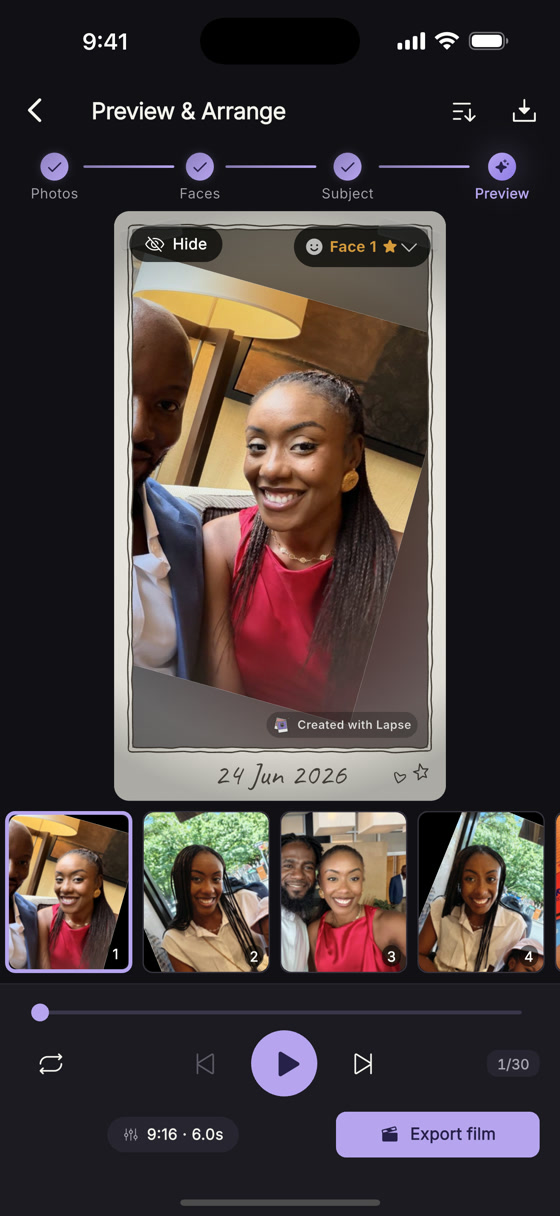
Choose the moments. Lapse aligns the frames.
Import the photos that matter, then choose who the timelapse follows. Lapse detects their face, centers the person from frame to frame, and lines up their eyes. Reorder or remove any moment, set the pace, choose a soundtrack, and preview the whole film before you export.
Bring photos from your device or Google Photos, or take a new picture. Lapse handles the alignment; you control the final cut.
See how Lapse worksPrivate by design
Your photos are processed on your device.
Face detection, eye alignment and film rendering all happen on-device. Lapse does not upload the photos you choose to its servers, and no Lapse account is required. If you import from Google Photos, Google handles sign-in and Lapse copies only the photos you explicitly choose into the local project on your device.
Read the plain-English privacy detailsNow on iPhone, iPad & Android
Create your first timelapse.
Choose photos of someone you love, then turn them into a face-aligned timelapse with music. Download Lapse on Android phones and tablets from Google Play or on iPhone and iPad from the App Store.